One gateway. Every model. Your rules.
Route requests across Anthropic, OpenAI, Google Gemini, and more — including your own models via BYOE — from a single integration point, with cost, latency, and policy-based controls on every call.
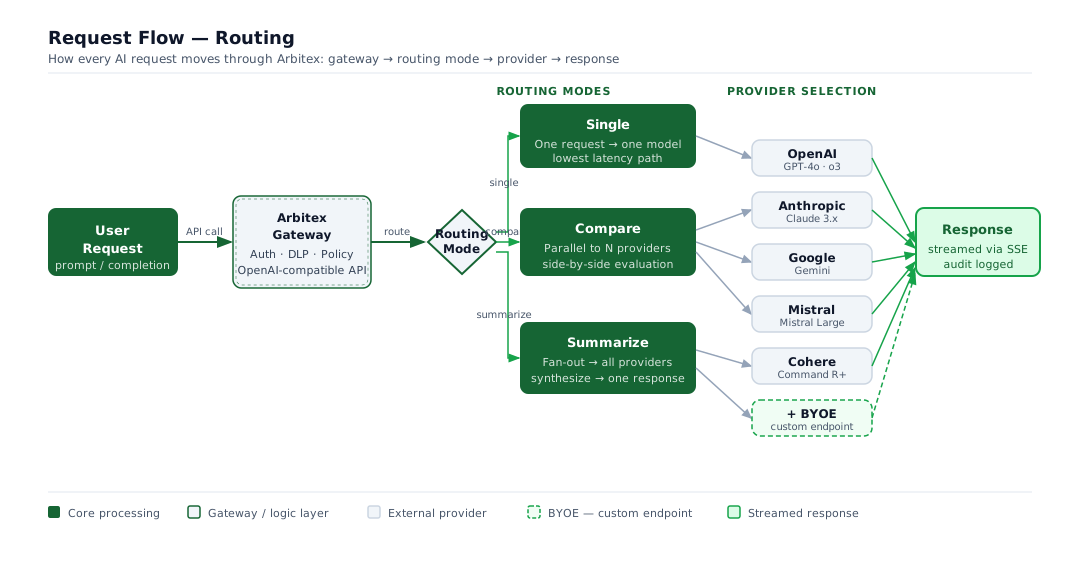
Pick the right mode for every request
Switch modes per request or per policy — no integration changes required.
Single
Send one request to one model — the default mode for every standard API call.
Compare
Stream two models side-by-side so teams can evaluate output quality in real time.
Summarize
Fan out across multiple providers, then synthesize all results into a single unified response.
Switch Modes Without Re-integrating
Switch routing modes per request or per policy with no integration changes required. The policy engine supports inheritance hierarchies so multi-tenant environments apply the right mode to the right traffic automatically.
Policy-Based Routing
Route by cost, latency, keyword-based intent routing, or custom policy rules with weighted balancing. Define routing logic per team, per project, or per request type. Simulate every routing decision in dry-run mode before deploying to production. The policy engine supports inheritance hierarchies for multi-tenant environments.
Automatic Health Monitoring and Failover
Per-provider health tracking detects failures and triggers automatic failover to healthy providers. BYOE (Bring Your Own Endpoint) connects any OpenAI-compatible API as a custom provider, adding redundancy without vendor lock-in. Real-time SSE streaming is preserved across all failover scenarios.
Instant Model Controls
Detect an issue, block the connection immediately. Platform operators can disable any model or provider with a single action — no deployment required. Emergency model lockout takes effect across all routing in seconds, giving operations teams immediate control when something goes wrong.
How every request is routed
From your first API call to a streamed response — Arbitex inspects, classifies, and routes each request through the right provider in real time.
How it works
Connect your app or open the web interface
Attach your application to Arbitex, or use the built-in web app — no SDK required. For SDK integrations, change your base URL to Arbitex Gateway: one line of code, and every request flows through the governance layer. All 9+ providers are accessible through a single OpenAI-compatible API surface. Multimodal requests — vision and document uploads — route through the same endpoint.
Set routing policies
Define which models handle which traffic. Assign routing rules by team, by project, or by request intent. Enforce provider restrictions and model allowlists through the policy engine. Headless API gateway mode handles application and agent traffic without a UI layer.
Monitor and adapt
Track per-provider latency, cost, and error rates on the real-time dashboard. Automatic health monitoring reroutes traffic when providers degrade. Review routing decisions in the audit log to verify policy enforcement across every request.